Who is this for?
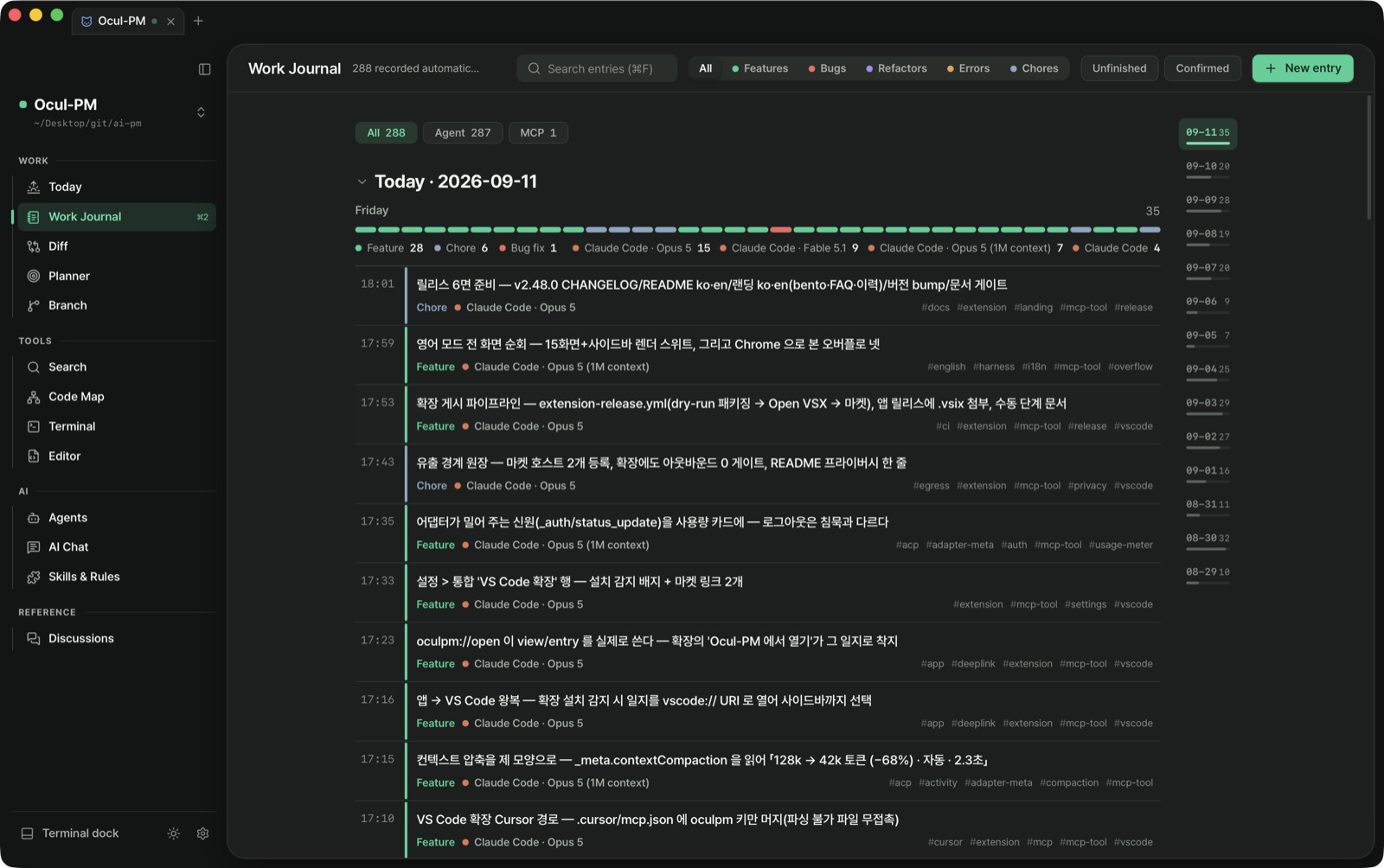
People who build with an AI coding agent every day and are tired of re-explaining yesterday's context to a fresh conversation. When Claude Code finishes a unit of work a journal entry is left behind, and the next conversation receives those entries and the remaining plan as its starting context — that is the one round trip above. If you only use an agent now and then, you may not need this round trip — and that's fine: the app is free and the data is markdown in your project folder, so you can stop at any time.
How does the next session pick up where the last one stopped?
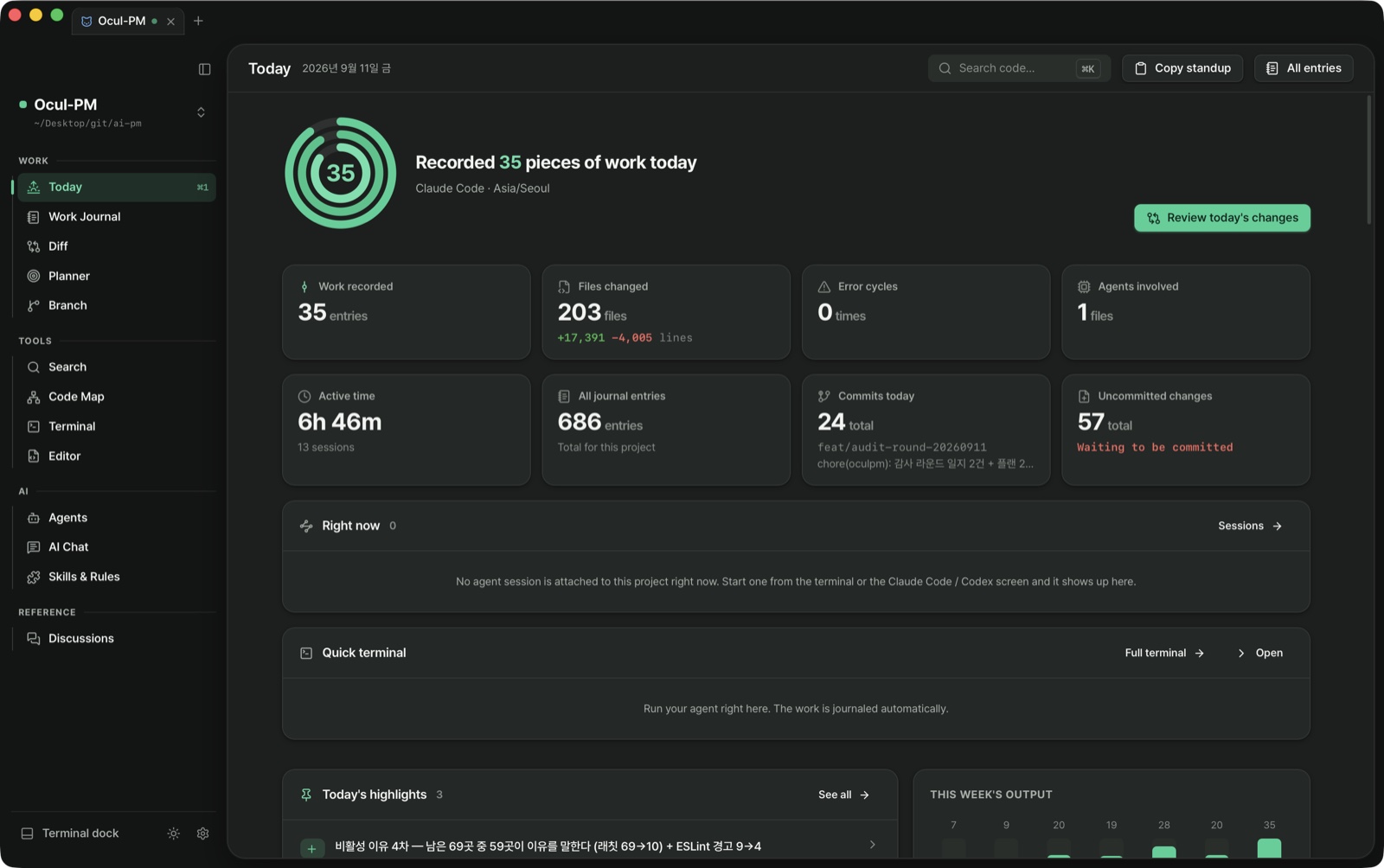
The Claude Code plugin's SessionStart hook carries the last three journal entries after the active plan items into the session-start context — no network, reading only the project's .oculpm/. What it delivered goes into a ledger, and Today's Resume card shows the same material and which conversation it was included in. Whether the model referenced it or was helped by it cannot be known, so the card does not claim it.
Can I use it inside VS Code?
Since v2.48.0 there is a VS Code extension, oculpm.ocul-pm. The editor is the real VS Code; the extension puts today's journal and the active plans in its sidebar — an agent's entry shows up within a second, and ticking a plan item's checkbox changes the .md and the app's planner together. The extension never edits files itself: writes go through the app's oculpm-mcp, so locking, the update log and concurrent-edit protection stay intact. Copilot agent mode sees the journal_write · plan_update tools as they are, "Open in editor" on a journal entry lands on that entry in the VS Code sidebar, and "Open in Ocul-PM" from VS Code lands on it in the app. VS Code 1.101 or newer is enough; Cursor and VSCodium get it from Open VSX. Installed without the app it runs read-only, and the extension opens no network connection.
Will macOS warn me when I install it?
Not since v2.45.0. Builds are signed with an Apple Developer ID and notarized, so you open the .dmg, drag it into Applications and launch it. Earlier versions were unsigned, so macOS refused them with "is damaged and can't be opened" — not real damage, just the quarantine flag macOS puts on downloaded files — and you had to run xattr -dr com.apple.quarantine yourself. If you are coming from an older version, your keychain may ask once on the first launch of this one: API keys live in the macOS keychain and access to them is bound to the app's signature, which has changed. Click Always Allow and it stops asking; nothing you stored is lost.
If I run several agents in split terminals, does the app tell them apart?
From v2.40.0, yes. Before that, splitting the terminal four ways and running four Claude Code sessions still showed the app a single session — each hook event carries its own conversation id, and we dropped it, leaving one constant label on screen. A work session now records every conversation that took part (the menu-bar tray says "4 conversations" and lists them in the tooltip), and each journal entry's frontmatter names the conversation that wrote it (the recording tool is a child process of Claude Code, so it already knows its own conversation; where it doesn't, the line simply isn't written). The work session itself is deliberately not split: the watcher that sees file changes doesn't know who wrote them, so splitting into N sessions would duplicate file counts and commit positions arbitrarily. Keeping one container and recording who was attached is the honest answer. In the terminal screen you can give each session a color (right-click its card) that the left stripe and terminal border both take, and the card reads "2/4 running" for that tab, keeping the count on the icon even when the rail is collapsed.
What is Ocul-PM?
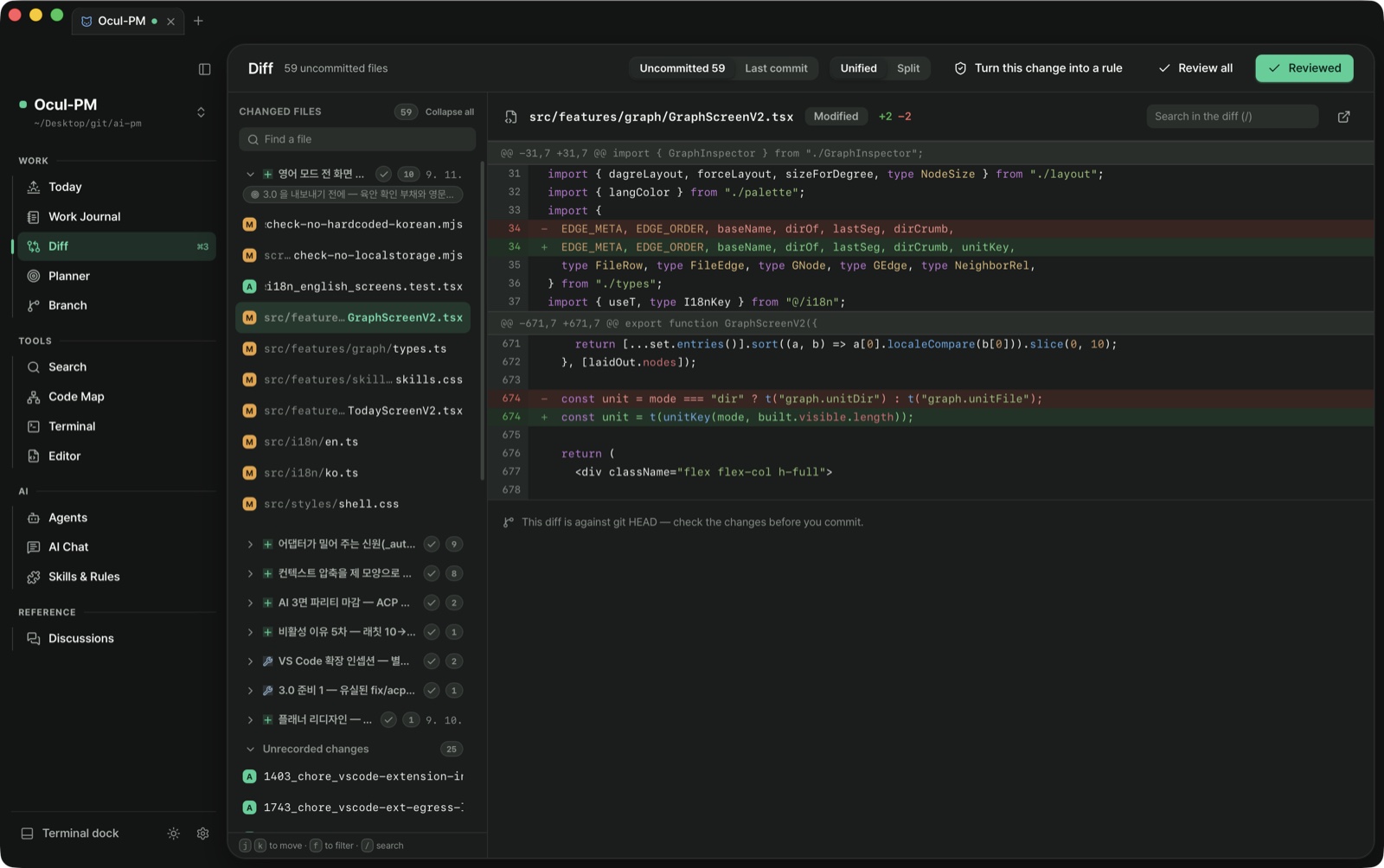
A local-first AI project manager for developers who work with AI coding agents. It records what the agents did, organizes it, and lets you verify every change against a local diff before you commit it.
Which AI coding agents does it work with?
"Supported" hides four different promises, so we split them into tiers. ① Rules-compatible — we only plant a rules file, and journals get written as far as the model obeys it: Gemini CLI · Cursor · GitHub Copilot · Windsurf · Cline · aider · Zed · Antigravity · pi (anything that reads AGENTS.md lands here). ② Structured journaling — the app registers the MCP journaling tools for it: Claude Desktop. ③ Session observation — hooks deliver start/stop and the app flags conversations that ended without a journal. ④ In-app — the agent runs inside the app and tool approvals arrive as cards: Claude Code · Codex (which include ② and ③). Per-agent evidence and when each tier was last verified are in the wiki tier table. Official builds are macOS Apple Silicon only.
Can I read and edit code inside the app?
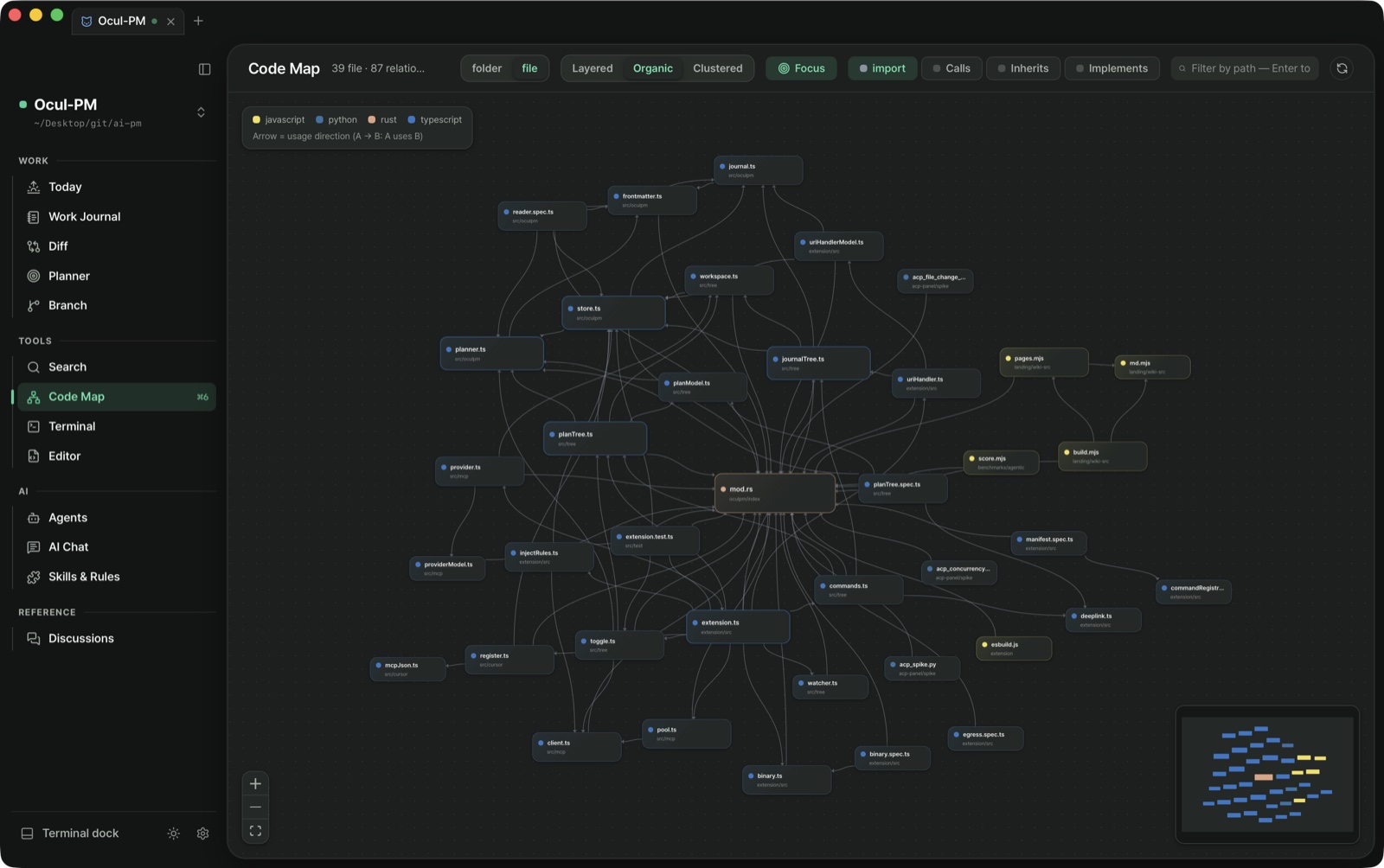
Yes. The Code screen browses the project tree, opens files and saves with ⌘S. Since v2.15.0 the editor understands the code — completion as you type, diagnostics underlined where they belong, hover types and docs, F12 / ⌘-click to jump to a definition, symbol rename that updates every file that uses it, and the code actions that come with a diagnostic. It works for Rust, TypeScript/JavaScript, Python and Go, and when a language server is missing from your machine it says so instead of failing quietly. Because a language server can run the repository's build scripts, from v3.10.0 it starts only after you trust the project on this device (one click in the status bar). It is not a VS Code fork — standard LSP is wired directly. Dotfiles (.oculpm/ · .github/ · .gitignore) show up in the tree. Search results and the code map jump straight to the line, and if an agent edits the same file, saving does not overwrite it — a banner asks which version to keep, and unsaved edits survive leaving the screen. Since v2.16.0 you get tabs and a split view, file create/rename/drag-move (delete goes to the trash), a breakpoint debugger (Rust · Python · Go) and an inline comparison that overlays what the agent changed. Since v2.19.0 ⇧⌘F adds project-wide search and replace against what is actually on disk. Since v2.20.0 images (png · jpg · gif · webp) and PDFs open in a preview instead of the editor — pictures on a checkerboard that reveals transparency, toggling fit-to-window ↔ actual size, PDFs as documents, up to 16MB regardless of the editor's 2MB limit (svg is both picture and code, so it still opens in the editor — and since v2.34.0 a live preview rendered from the unsaved buffer sits beside it). Since v2.21.0 you can drag files and folders in from Finder or paste them with ⌘V — same names are never overwritten, they get a -2 suffix, folders recurse, and symlinks are skipped. Since v2.34.0 the editor also keeps the hygiene of one you leave open all day: save-time whitespace and final-newline cleanup plus auto-save (both off by default; auto-save never touches the cursor's line), preview tabs that do not pile up while skimming, ⇧⌘O symbol and ⌃G line navigation, sticky scroll, a problems panel with project-wide diagnostics, and local history — a version per save and per agent edit, kept in .oculpm/ rather than git. Since v2.47.0, ⌘P opens files by fragments of their name (agmd → AGENTS.md), tree and tab names carry git status (modified · added · deleted) and diagnostics as colour, breadcrumbs show the symbol under the cursor, and ⌥Z word wrap turns itself on for prose files.
Can I see the terminal next to another screen?
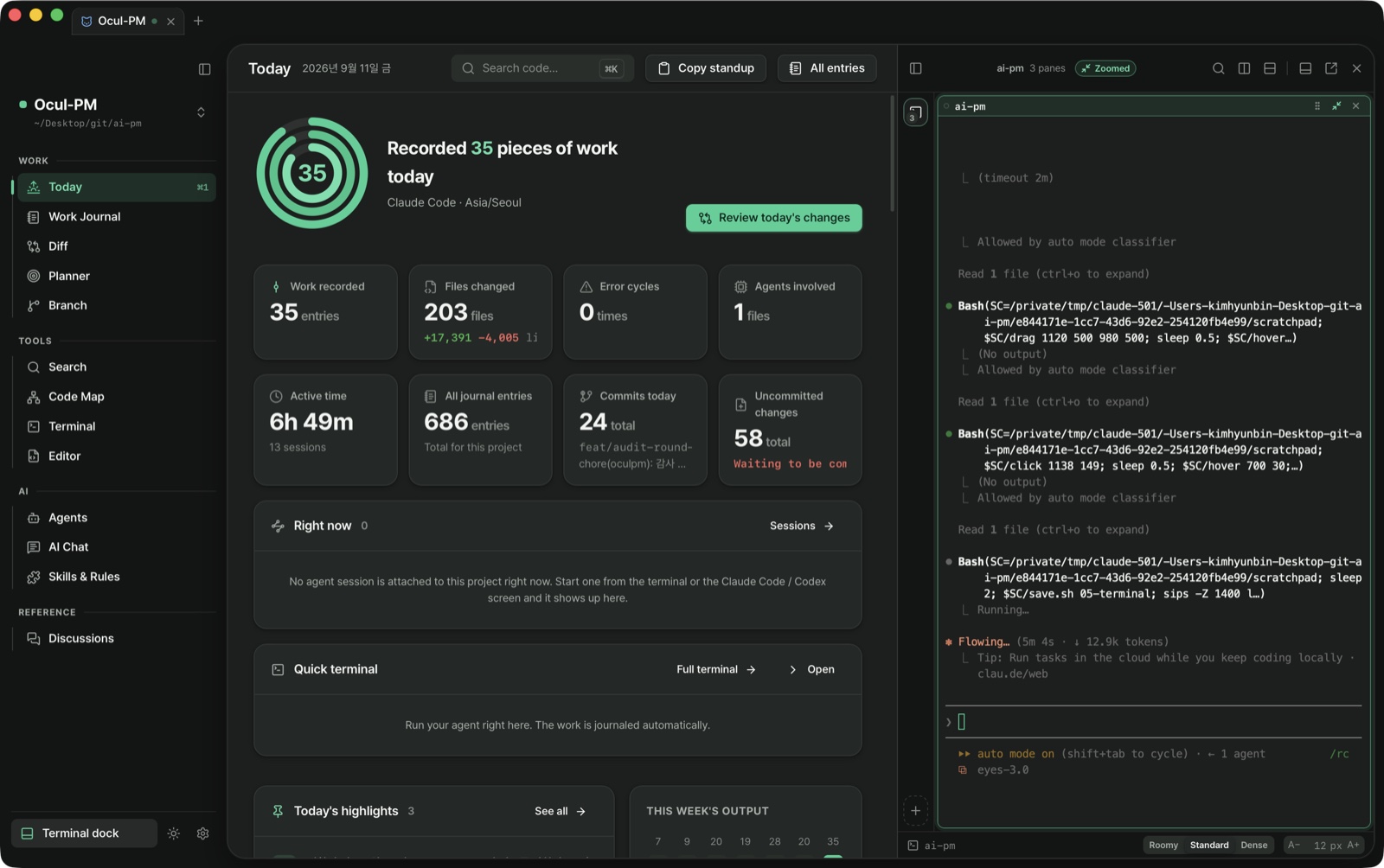
Yes. Since v2.10.1 ⌘J opens a terminal dock over whatever screen you are on. Dock it to the bottom (wide), the left or the right (tall) and drag the edge to size it. You can pull it out into a window of its own without dropping the shell — scrollback comes along. Since v2.22.0 sessions stand in a vertical list on the left where each card carries status, agent, elapsed time and last command — drag a session to the edge of the screen and the pane splits so you can watch two at once, and the split's handle (⠿) swaps them or pops one out as its own session. Font size is set in px in Settings → Appearance; line height and padding are a separate density setting (roomy / standard / compact).
Running several agents at once gets confusing. Does the app help?
That is exactly what v2.23.0 targets. When an agent calls for a human (terminal bell) that session turns amber and a "N waiting" banner appears above the list — click it and you land on the session that is waiting, then cycle to the next. A bell is certain because the program rang it; "quiet for 20 seconds" is a guess, and it is written as a guess. Output is also split per command: each command gets a status bar (green success, red failure), failure points are dotted along the right edge of the whole scrollback, and ⌘↑ / ⌘↓ jump between commands. Clicking a status bar offers copy, plus "save as a journal entry" and "attach to the planner" — the entry opens prefilled with the command line, exit code, duration and the last 40 lines of output. There is deliberately no re-run button; it only prefills the prompt, so nothing you have not looked at runs by itself.
Can I tell whether my rules and skills are actually being read?
Yes, since v2.24.0. Every item on the Skills & Rules screen carries an "N times in 30 days" badge, and the budget bar splits what enters each session into always-loaded, conditional (measured), irrelevant, skill blurbs, and agents & commands. It is counted deterministically from the Claude Code transcripts on this machine — the moments a rule was actually injected — so no LLM and no network is involved. Since v2.36.0 a conditional rule's badge reports how many files its globs actually match in this project rather than how many globs it has (over 30% and it is flagged "always in practice"), and rules you load and then override in CLAUDE.md are called out with the sentence that overrides them. A skill that never fired is no longer assumed to be broken: the screen separates "nothing to act on", "held back by your own instructions" and "too new to tell", and only suggests a rewrite for a genuine description problem.
What leaves my machine?
Exactly five things. ① LLM requests — sent straight to the provider you chose; we have no relay server. ② Claude Code and Codex inside the app — their own provider traffic under your subscription, plus a one-time adapter download from npm (version- and hash-pinned). ③ Update checks — one GitHub release file. ④ GitHub fetches for patch notes, bundles and theme files (GitHub or the oculpm.com gallery) — only when you click. ⑤ A one-time embedding-model download the first time you enable semantic search: the model comes down, your code never goes up, and search is offline afterwards. Never leaves: journal entries (except what you ask the AI about), everything under .oculpm/, your source code (except snippets sent with a question), and API keys (OS keychain only). No usage statistics, no crash reporting — there is no analytics SDK in the app. The full list, and how to count the calls yourself, is on the privacy page.
What happens if an agent edits a journal entry after I verified it?
Since v3.2.0 the verified mark is stored with a fingerprint of the body you verified. If the body changes afterwards, the entry shows "Changed after review · re-check" in the ledger row and the reading pane, and the "verified only" filter and change-review groups stop counting it as verified. Read it again and click verify to bind the mark to the current content. Entries verified before 3.2.0 have no fingerprint and are honoured as-is — nothing is retroactively unverified. The fingerprint lives in the entry's front matter (verified_hash) under .oculpm/, so it is readable without the app.
Can I bring in conversations from another tool?
Yes. Since v2.30.0, Settings → Data → "Import past conversations" opens an export (.json or .zip) from Claude and friends and lists what is inside with dates, titles, turn counts and a guessed entry type; you pick the ones that belong to this project and they become journal entries. Nothing leaves your machine while you read that list — skimming hundreds of conversations is entirely offline and free, and only what you pick calls the background model, once each. Entries land on their original dates, and re-opening the same file marks already-imported ones "imported" rather than billing you twice (they are not hidden — a conversation vanishing with no explanation is worse). Everything imported starts unverified: it did not happen in this repository, so it stays a draft until you read it and tick it off.
What happens when the network drops?
Everything local — journals, search, diffs, the planner — keeps working. Where models are involved, three things changed in v2.30.0. ① When your chosen model does not answer and a fallback replies instead, that reply carries a badge — previously a different model answered while the screen still showed the name you picked. The fallback applies to that one call; your settings are untouched. ② Unreachable providers are dimmed rather than hidden — hiding them reads as your settings having been wiped, and blocking them means you cannot pick one the moment connectivity returns (the reason is in the tooltip). ③ Automations defer instead of failing: a run that could not reach the network is recorded as "deferred" and does not burn its slot, so the catch-up rule picks it up once you are back. A failure that did get a reply (a 429, an auth error) means the network was fine — that is still a failure.
Does the AI panel resend the same context on every question?
No. Since v2.29.0 it no longer reloads the whole plan, the recent journal and the working rules for every question. When a conversation starts it loads a list of what exists exactly once — and that list does not change by a single character until the conversation ends, because a stable prefix is what keeps the model-side prompt cache alive — and bodies are pulled only when needed. Past records attach only to questions carrying a recall signal: "what did I do last week", "what did I say", "how far did the plan get". The decision uses a Korean/English signal-word dictionary, so it calls no AI, and past the ~800 token ceiling it drops whole records starting with the least relevant. Rules used to be truncated at 2,500 characters, and that cut once swallowed the "never write secrets" clause outright — now only three lines stay resident and everything else arrives in full. To push something in deliberately: /rules · /plan · /journal · /skill. Settings → Context shows you exactly what goes in.
Can I build my own theme colors?
Yes. Since v2.28.0 a theme is a file. In Settings → Appearance you create one or "duplicate and edit" any of the five built-ins (Solarized · Sepia · Nord · Dracula · High Contrast), then export and import as .json — the built-ins use the same format, so the built-ins are the examples. There is no separate preview box because the app itself is the preview: change one color and the sidebar, cards, borders and status colors change with it. Colors you did not change are left alone — a theme that sets five background lines is a complete theme, everything else inherits the light or dark default, and each token has "reset to family default". A theme that specifies no accent keeps the accent you chose, and on macOS "follow the system accent" paints it with the OS color. Bind a theme to a project in the project editor and only the window looking at that project wears it. An imported file gets a fresh identifier, and a name collision asks whether to overwrite or keep a copy. A theme can only paint a fixed list of colors, so nothing else in the file reaches the screen.
Can I tell my own journal entries apart from the ones AI wrote?
Yes. Since v2.27.0 every record carries a provenance badge — by hand (a person writing in the app) · by agent (Claude Code and friends following the journaling rules) · auto-draft (a background model after the edits went quiet) · schedule · watcher · MCP · backfill (restored from git history). It shows on journal cards and details and in the Today activity feed, and a filter row above the journal narrows by source — not drawn at all when the list has only one kind, because a filter that cannot narrow anything is noise. No new field was invented: it is read deterministically from the session id and agent id already written in the entry file.
Can it produce a summary on a schedule?
Yes. Since v2.26.0, set an instruction and a frequency in Settings → Automation and the app runs it at that hour — "every Friday at 17:00, summarize this week's commits and open items", for example. Frequencies cover once, every N minutes, every N hours, daily, weekly, monthly, yearly and cron, and the first visit suggests three examples (weekly dev summary, morning briefing, monthly retro) switched off — you create them with a click and decide about enabling afterwards. Definitions are markdown files under .oculpm/automation/, so you can edit them by hand and commit them with your team. Automation is entirely opt-in, and if no background model is chosen it is skipped silently rather than erroring — so nothing bills you without your knowing. There is a daily run cap (20 by default), and the run log records skips, drops and failures with reasons, not just successes. If the Mac was asleep or the app was closed, it catches up exactly once instead of stacking up. Since v2.27.0 the trigger can be the working folder rather than the clock: when file changes go quiet for the interval you set (0.2s to 10min), it drafts a journal entry or updates the plan.
Can I open several projects at once?
Yes. Since v2.9.0 one window holds several projects as tabs. Drag to reorder, or out of the window to make a new one, and since v2.22.0 you can drop a tab onto another window's tab strip to merge them back (the insertion point is shown while you drag, and moving the last tab closes the empty window). Since v2.24.0 it behaves exactly like Chrome — the moment a tab leaves the strip it becomes a real window that follows your hand off-screen and over other apps, and aiming at another window's tab strip hides the one you are holding and shows where it will land. Since v2.25.0 a torn-off window can be dragged back: a window with a single tab is picked up whole and merges when dropped (Escape puts it back where it was). Right-click a tab for the same operations from a menu, or Shift+F10 from the keyboard. Each project remembers its own screen, filters and sidebar state, and terminal sessions belong to the project, so they survive a tab moving between windows. ⌘T new tab, ⌘W close tab, ⇧⌘N new window.
Does it only record, or does it produce something?
The Today screen’s Copy standup turns yesterday-to-today into shareable text on your clipboard, and the Branch screen exports that branch’s commits, journal entries, plan items and changed files as a single markdown page. With an AI configured it polishes the result; without one it still works with the default format. v2.46.0 removed the Retro screen and the PR-body and weekly-report deliverables that lived on it — a large surface with little use.
Can I use it from a phone or tablet?
Yes, in beta. Since v2.18.0 the Mac runs a server reachable only inside your Tailscale network, and a phone browser opens today's journal, the planner, discussions and the AI chat. Turn the server on in Settings → Mobile, scan the QR code and pair once with a six-digit code; add it to the home screen and it behaves like an app. The theme you picked on the desktop carries over (themes you built yourself follow only their light/dark family on the phone for now), and your AI API keys stay in the Mac keychain. During the beta, search and the code screen are desktop-only.
Can I tell what an agent is actually doing from the screen?
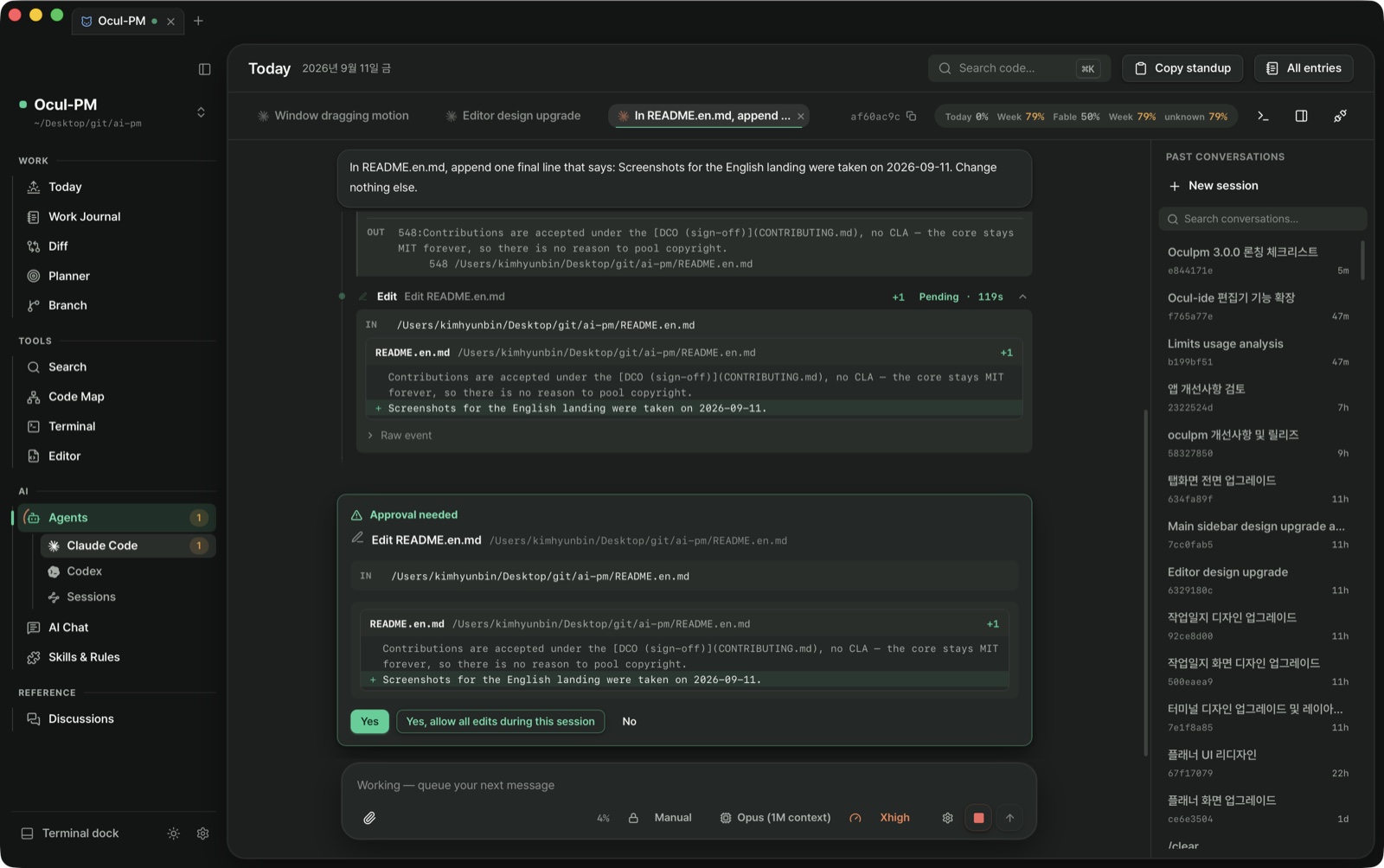
From v2.44.0 tool calls are drawn in 15 words of our own. When an agent records through the tool the app plants in your terminal, it reads as "wrote a journal entry"; editing a plan reads as "updated the plan" — all of which used to be a terminal icon and one line of shell. Reads, edits and searches fold into a single row, but approvals, errors and anything touching the record never fold, so the places that need your hand can't hide inside a collapsed group. Expand a row and the agent's raw exchange sits at the bottom, collapsed but always present — an escape hatch for when our classification is wrong. When reading a shell command, anything less than certain is drawn as a plain command: claiming "wrote a journal entry" wrongly would be a lie about the record. And "running" is distinguished from "don't know" — after 15 seconds with no signal it says "running · no signal".
Does the app notice when an agent finishes without writing an entry?
Yes. A plugin hook judges each conversation as it ends, and if code changed with no entry it blocks the turn once and asks for the record (once per conversation). From v2.43.0 that verdict is per conversation. It used to be a single number — the newest journal timestamp anywhere in the project — so with several terminals open a neighbour's entry hid your own miss, and a neighbour's edits were read as yours. Counting the record showed the 164 signals were session segments, not sessions, and of 117 unique conversations only 2 had genuinely skipped. Now, with no grounds it says "undecided" rather than folding not-knowing into not-recorded. Claude Code and Codex conversations opened inside the app count too: judged at the end of each turn, announced once above the conversation, and cleared automatically when you record. In-app conversations and terminal agents recognise each other, so neither is blamed for the other's edits. One deliberate trade-off: while several conversations are alive at once the gate stays silent — rather than accuse the wrong one when attribution is not certain, it says nothing, and still records "undecided" in the ledger.
Does my code or data leave the machine?
No. Everything lives in your project's .oculpm/ folder and a local SQLite cache. Exactly five things leave, and you start every one of them: the LLM API calls you make yourself, Claude Code and Codex inside the app (with a one-time adapter download the first time), the update check for new versions, a GitHub fetch when you ask for a plugin bundle, release notes or a theme (themes can also come from the oculpm.com gallery), a one-time embedding-model download when you first turn on semantic search. The v2.18.0 mobile bridge (beta) is the same — it is served only inside your own Tailscale network, never exposed to the public internet, and the phone talks to your Mac without passing through a third-party server.
Do terminal sessions survive an app update?
They survive. Since v2.19.0 terminal sessions are held by a process detached from the app, so after an auto-update or a restart your terminal tabs come back with their scrollback and whatever was running (including Claude Code sessions). v2.34.0 and v2.34.1 were an exception: they renamed the socket where the app meets that process according to the version, so updating onto those builds cut the session loose once. v2.35.0 fixed it — the address no longer moves, the app adopts a process left at an older address, and every path that reaped a session-holding process within minutes is gone. Closing a terminal tab or a project tab yourself still cleans that session up as before. Since v2.35.0 a Claude Code conversation also shows its session id, so you can reopen the same conversation in a terminal with claude --resume <id>.
Can I use it without the app, just the Claude Code plugin?
Yes. In Claude Code, run /plugin marketplace add bunhine0452/Ocul-PM and then /plugin install oculpm@oculpm — two lines that set up the hook bridge, 7 MCP tools and 5 skills across all your projects. Journals and plans accumulate as markdown under .oculpm/, and if you install the app later it reads those records exactly as they are.
Is the app available in English?
Yes. Since v2.8.5, Settings → Appearance lets you pick English or 한국어 and every screen plus the error messages follow. The language the AI writes journals, discussions and planner items in is set separately, so an English UI with Korean records (or the reverse) is possible, and documents already written are never rewritten.
Can I download it now?
Yes. It is a free download from GitHub Releases — macOS (Apple Silicon), plus Windows (x64) and Linux (x64, AppImage and deb) as a beta. Once installed, later versions update themselves from inside the app (the Linux deb updates through your package manager). Intel Macs are on hold because the embedding runtime has no x86_64 prebuilt.
Does it run on Windows or Linux?
Yes, as a beta. Windows gets an x64 installer (.exe) for Windows 10 2004 (build 19041) or later and Windows 11; Linux gets an x64 AppImage and a deb. Linux needs glibc 2.35 or later (Ubuntu 22.04 · Debian 12 onward) plus libEGL and libGLESv2, and the AppImage needs FUSE 2. The Windows build is not code-signed, so on first launch SmartScreen shows "Windows protected your PC" — click "More info → Run anyway". If the Visual C++ runtime is missing, the installer installs it first. The Windows install and the AppImage auto-update in-app; the deb updates with the next .deb. Each release only ships the OS builds that passed an install test and a real-app E2E run on CI runners — a version that did not pass has no file for that OS. The beta label comes off once reports from real PCs accumulate.
Can I ask about team, enterprise or partnership use?
Yes. Because Ocul-PM is local-first, adopting it on a team does not move your code or your records anywhere. For enterprise rollouts, team adoption and partnership proposals, write to bunhine0452@gmail.com — the person who built it reads and answers.